Welcome to TCU!
We are excited you are joining TCU’s Horned Frog Faculty. The Teacher-Scholar Model is a core concept that shapes TCU and the ways we engage with students and our work as faculty. This model benefits faculty and students. As faculty, it offers a connection between teaching and research and creative activity and brings students into scholarly endeavors. Interested in a student perspective, see TCU on The Campus Tour.
Do you have a contract?
No: Contact the person who hired you or your department’s admin to find out when you will be emailed your contract.
Yes: Complete the task list in PageUp including (1) submitting graduate transcripts and (2) presenting your original documents to complete your I-9 documentation.
Do you have a TCU ID number?
No: The ID number is located on your contract or obtained from your department contact.
Yes: Use your TCU ID number and birthday to create username, password, and TCU email account. Go to it.tcu.edu/newemployees/ to create your TCU account and access the IT onboarding checklist and services.
Once you have a TCU ID and email address, you will be automatically enrolled in a course for new faculty located in the LMS special courses.
Are you teaching for Brite Divinity School?
Contact Ashley Washington at (817) 257-6646 or a.a.washington@tcu.edu with your onboarding questions.
Tasks Available Online or by Phone
- TCU Benefits contact Human Resources
- Office keys and building access contact your department admin or supervisor.
- Classroom technology assistance including training in your classroom(s) contact the Center for Instructional Services (CIS) at 817-257-7121.
- Compliance training watch for an email from HR or visit my.tcu.edu.
- Safety on campus see TCU Alerts and download FrogShield app for your mobile device.
- Emergencies on campus contact TCU Police at 817-257-7777 instead of 911. This minimizes response time as campus police assists emergency responders to get to you sooner.
- Internet, campus phone, and other technology issues contact IT Helpdesk at 817-257-6855.
Tasks You Must Do on Campus
- Use visitor parking if you do not yet have a TCU parking permit.
- Visit ID Center for photograph and printing of your TCU ID.
- Add personal devices to TCU wifi.
- Request parking permit from TCU Police Department. Check their website for more details.
Interactive Map
TCU’s interactive map is a great resources. Note that you can filter to identify relevant locations on campus. The health, wellness & safety, and services filters worth reviewing.
L.E.S.S. is more
Be sure to review the L.E.S.S. is More safety information for the building(s) where you teach. Scroll down to download the safety map for your building(s).
Preparing for Your Class
- Login to classes.tcu.edu for information about your class(es) (e.g. building, room, days, time).
- Locate buildings for your classes and identify relevant emergency information. Check for classroom assignments right before classes start in case the location has changed.
- Place textbook orders using Order Textbooks on the LMS homepage.
- Determine if your course is part of the TCU Core Curriculum
- The Registrar’s website includes helpful information like the academic calendar and finals schedule.
Syllabus
- Use the TCU Syllabus Template to ensure your course syllabus has the required details.
- Also see TCU Syllabus Resources.
TCU Learning Management System
- TCU Online will be available to you 24 hours after (1) your class(es) are assigned to you by your department on classes.tcu.edu and (2) you have created your email, username, and password.
- Getting Started with TCU Online
- Contact KoehlerCenter@tcu.edu for assistance.
Accessible Course Content
Your course content should be accessible to a variety of users including learners with disabilities, learning differences, and English is a second language. Formatting for accessible content does not rely on a single sense or ability. Learn more about creating accessible course content.
Don’t Cancel that Class
Don’t Cancel that Class offers a variety of workshops for your class in the event you are away for conference, meeting, or other event. The request 1-2 weeks advance notice.
Final Evaluative Exercise
TCU faculty must hold a final evaluative exercise during the finals time scheduled by the registrar.
TCU Accreditation – SACSCOC
TCU is accredited by the Southern Association of Colleges and Schools Commission on Colleges, SACSCOC. The work you do as faculty is linked to our accreditation.
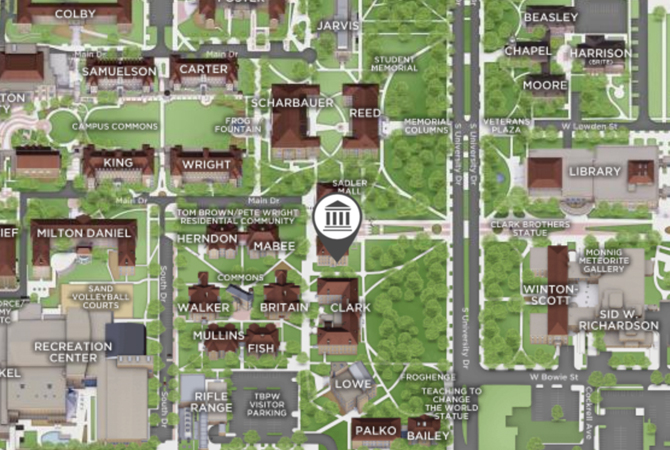
Sadler Hall 3rd Floor
New to TCU Faculty Orientation
Welcome to TCU! We are excited that you are joining our flourishing faculty of teacher-scholars. New to TCU Faculty Orientation is your opportunity to connect with new colleagues and learn about the resources that support the TCU community. We strive to host inclusive and accessible events that enable all individuals, including those with disabilities, to engage fully. If you have any questions about orientation, please contact Cecilia Lunt, Coordinator of Office Operations for Faculty Affairs, c.s.lunt@tcu.edu. We are looking forward to meeting you.
Full-time Faculty at TCU attend orientation in person at the beginning of the semester they will begin teaching. In the fall, New Faculty Orientation includes breakfast, lunch at the Chancellor’s Residence, and an evening reception with the Provost on Monday; and a dedicated HR Benefits session on Wednesday morning.
New Faculty Orientation is hosted by Faculty Affairs, the Koehler Center for Teaching Excellence, Human Resources, the Office of the Provost, and the Office of the Chancellor.
Additionally, full-time faculty have access to the N2TCU Full-time Faculty Orientation resource course in our learning management system, Brightspace by D2L. This course contains resources and materials you may access at any time. Enrollment in the orientation resource course will happen automatically once the faculty member creates their TCU username and email address.
Full-time Faculty Orientation Dates:
Spring 2027: Tuesday, January 12, 2027 – Location TBD
Fall 2027: TBD August 2026 (Monday) – Location TBD
Adjunct Orientation is hosted by Faculty Affairs and the Koehler Center for Teaching Excellence. Adjunct faculty hired within the past 3 years may attend either of of two sessions:
Adjunct Orientation is hosted by Faculty Affairs and the Koehler Center for Teaching Excellence. Adjunct faculty hired within the past 3 years may attend either of two sessions:
Friday afternoon in August (TBD)
Saturday morning in August (TBD)
All new adjunct faculty will have access to a robust, self-paced orientation course through our online Learning Management System, D2L.
All new adjunct faculty will have access to a robust, self-paced orientation course through our online Learning Management System, D2L. Enrollment in the online orientation resource course will happen automatically once the adjunct faculty member creates their TCU username and email address.