What is Copyleaks?
Copyleaks is a text-matching tool faculty may use for Brightspace course assignments. Copyleaks works by comparing submitted assignments to content in the Copyleaks database and highlights matching text. The results appear in a Similarity Report, which shows the percentage of matched text. Additionally, although there is no tool that can provide actionable, definitive proof of AI use, Copyleaks also provides an AI usage likelihood report.
Important Notes:
- Copyleaks is a text-matching tool and plagiarism detector, providing clearer reporting than competitors
- The report shows percentage of matched text, not whether work is right or wrong
- Review the Similarity Report to check for citations and paraphrasing
- Properly cited quotations and references will still appear as matches (this is normal!)
- Faculty can use this report, along with an assignment rubric, to assess student work
Submitting a Copyleaks Assignment
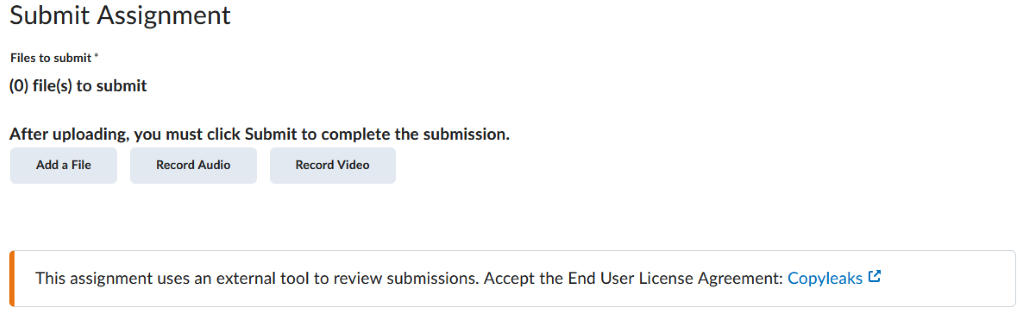
If a professor has enabled Copyleaks for an assignment, students will see a link to an end user agreement. Students must accept this agreement in order to submit their assignment:
Viewing the Similarity Report
Similarity Report
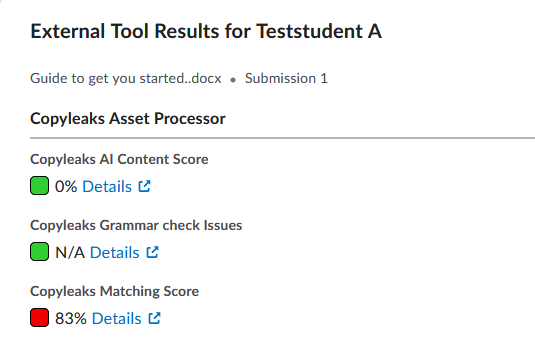
If a professor has made the Similarity Report available to students, students can view the percentage of their text that matches a database of sources (Copyleaks Matching Score). The report categorizes similar content into 3 categories: Identical, Minor Changes, and Paraphrased.
Copyleaks will look for matches in the following sources:
- current/archived web site content
- other student papers
- scholarly publications
View your Similarity Report
If the faculty member has made the assignment’s Similarity Report available, students can view it on the Assignments page.
Find your assignment in the Assignments area, then:
- Click on View beside the assignment (visible in the External Tool Results column)
- In the window that opens, look for Copyleaks Matching Score and click on Details
Understanding the Similarity Report
Interpret the Similarity Report
How to Interpret Copyleaks Report
Resources
How should I interpret the similarity report?
What are the different types of text similarity?
How is the percentage at the top of my plagiarism report calculated?